Tag admin Portlet
From Sense/Net Wiki
- 100%
- 6.0
- Enterprise
- Community
Planned
Overview
Tag Admin Portlet is responsible for administrating tags of contents.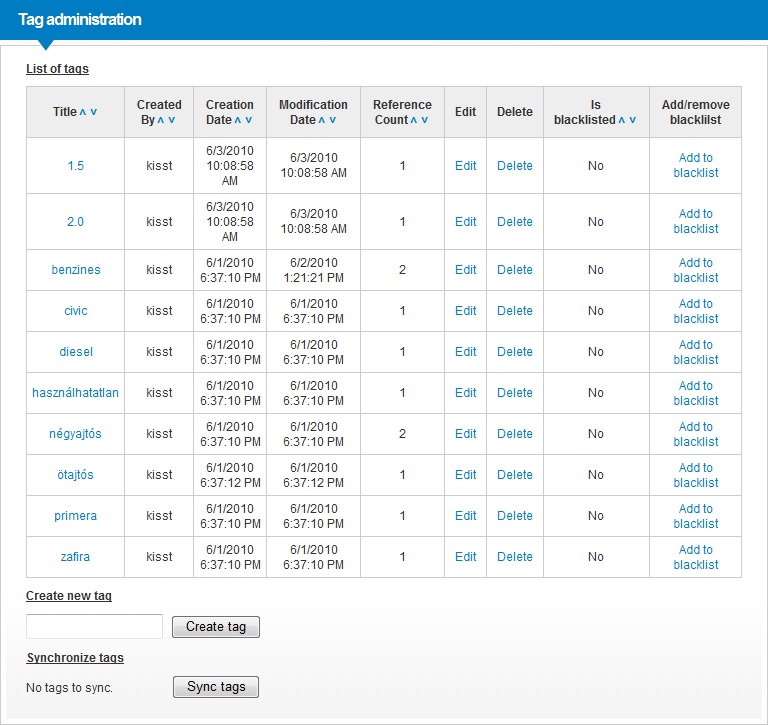
Details
Tag Admin Portlet is intended for administrating tags in the system.
The following actions can be performed:
- Listing tags with sorting based on any property
- Add a new tag to content repository ()
- Edit, delete and blacklist any tag in the content repository
- Import new tags to content repository
- Delete unused tags from content repository
- Search for tags via the Tag Search Application
Creating new tags
- Creation of new tags will use the TagManager.AddToRepository("TagToAdd", "PathToSave");
- New Tag contents will be created in the repository. The creation path depends on the TagPath property of the portlet.
- Reference counts of new tags will be set to zero and will be suggested to purge until they are used.
Editing and Deleting tags
- Tag Edit Applitaion is used for editing
- Tag Delete Applitaion is used for deleting
Reference counts
- Reference counts are based on the Lucene Index. TagManager.GetTagOccurrencis() is used.
- Only the referenced tags will have results from the above function, unreferenced tags will have none.
- If a tag's reference count is zero then it will be suggested to purge.
Search for a specific tag
- When clicking on the tag name, redirection will happen to Tag Search Application for instant searching
Properties
Here below you can see the editable properties of this portlet:
Own properties
| Property | Property name for embedding | Possible values | Description |
|---|---|---|---|
| Path of tags | Tags | Text | The path of tags (within the Sense/Net Content Repository) to be administrated |
| Content view path | ContentViewPath | Text | The ContentView path of portlet. Default value is /Root/System/SystemPlugins/Portlets/TagAdmin/TagAdminControl.ascx |
User group informations
for End users
How to use
The Tag Admin Portlet works the same way as most of the porlets. Find more information about how to Manage Portlets on a page, and look at the Smart Application Model feature too.
for Portal builders
PageTemplate embedding code
To embed into a Page Template use the following code:
<snpe:TagAdminPortlet runat="server" ID="{UniquePortletID}" Tags="{ContentPath}" />Explanation of the tags
- The snpe:TagAdminPortlet specifies that you want to embed a Content portlet
- The ID attribute is compulsory and has to be unique within the Page Template
- The runat="server" attribute is required for the portlet to work
- The Tags attribute specifies the path of tags to be displayed
HTML fragment for skining
Example/Tutorials
Related links
- Tag cloud Portlet
- Tag (Content Type)
- Tagging
- Tagging for Portal Builders
- Tagging for Developers
- Tagging for Endusers
- Tagging for System operators
