Workflow Definition
- 100%
- 6.0
- Enterprise
- Community
Planned
Overview
Workflow definition is special file content that holds the information about the steps of the Workflow.
Details
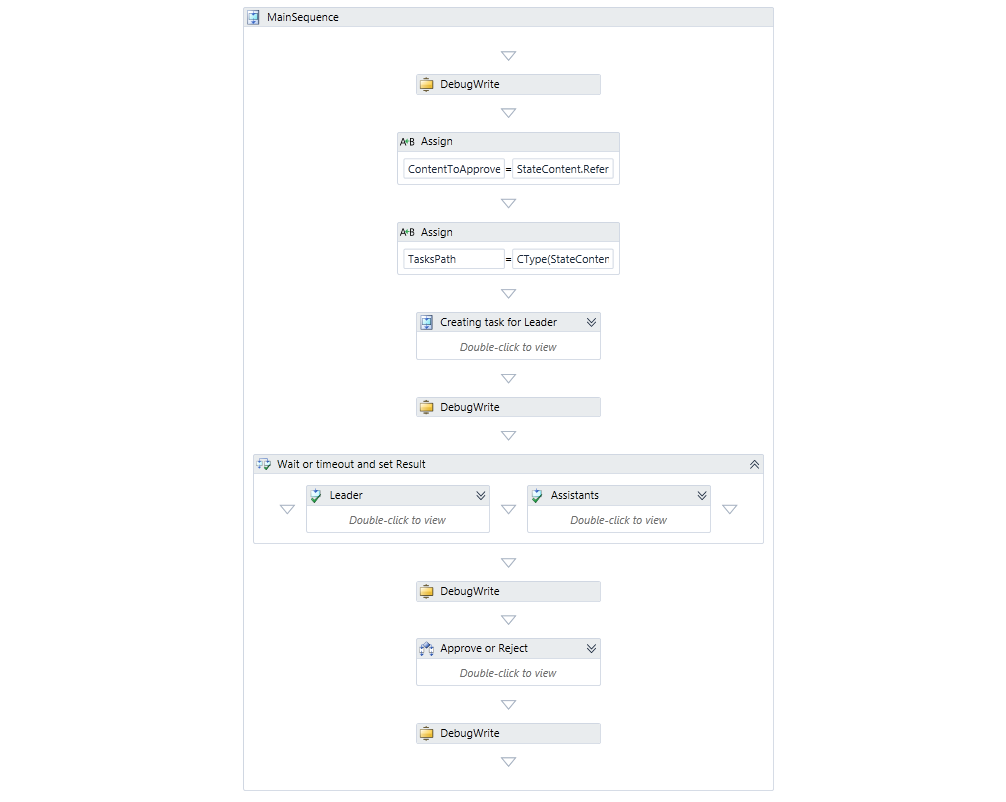
Sense/Net workflow framework is built on the Windows Workflow Foundation 4. The atomic steps of the workflow (e.g. sending an email or approving a document) are defined in the workflow defintion file. This is a .XAML file that can be edited in Visual Studio Workflow Designer or directly with any text editor.
Activities
As a workflow can be considered as a declarative program, its steps can be considered as statements. These are called Activities and can be as simple as sending a message but may perform a lot more complex tasks too. Activities can contain other activities - this allows the builder to create a workflow structure that is easily understandable but able to achieve lots of different tasks.
.Net activities
The Workflow Foundation has a base activity library with different types of activities, for example:
- Assign: assigns a value to a variable in the workflow
- If: creates a branch of execution
- SendMessage: sends a message via WCF
- Sequence: groups together a set of activities that are executed sequentially
- ForEach: executes an activity for each object in a collection
- While: executes a single activity as long as a condition as true
- Pick: waits for two or more events to happen. The first one to occur will determine the subsequent steps of the workflow.
- ...
Sense/Net-specific activities
Sense/Net ECM has a few built-in activities related to the Content Repository. These activities are usually about managing content items or waiting for them to change.
Create Content
Creates a new content in the specified folder with the specified content type and initial field values.
Assign field value
Sets a single field value and saves the content.
Set permission
Changes content permissions.
Wait for content change
The WaitForContentChanged activity suspends the workflow until the specified content (e.g. a task or a document) changes. This requires an existing content in the Content Repository.
Wait for container change
The WaitForContainerChanged activity expects a container (e.g. a folder or document library) and suspends the workflow until somebody creates a new content or edits any of the existing ones inside that container. Usually this is about waiting for a user to upload a new document. As an output parameter you receive the new or changed child content and the information about the operation itself (whether this was a content creation, edition or deletion).
Developers can create their own custom activity that performs a task specific for the business process - for example communicating with another system or make custom database updates.
Edit the file in Visual Studio
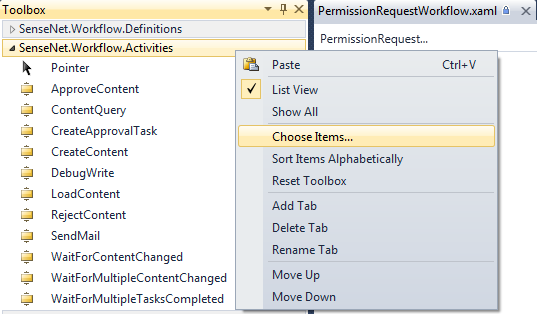
Visual Studio has a Workflow designer built on WPF that lets you compose a workflow with drag-and-drop and fill the necessary properties of the activities. If you create your own custom activities, they can be displayed on the Toolbox panel and used the same way as the built-in activities. If you create an Activity in your solution, it will appear automatically on the Toolbox. If the activity is in a different library you have to add it manually: right click anywhere on the Toolbox and select Choose Items.... On the opening window you can add your custom libraries and the activities in it.
After editing the file in Visual Studio you need to update the file in the repository - this means copying the XAML data to the existing file in the /Root/System/Workflows folder.
