Query Builder
- 100%
- 6.3
- Enterprise
- Community
Planned
Overview
Sense/Net Query Builder helps users to build complex queries against the Sense/Net Content Repository. It has two modes: the Query Wizard and the Query Editor. The Query Wizard helps novice users to create queries with only a few simple clicks, while the Query Editor enables expert users to edit queries in free text with the Sense/Net Content Query Language (CQL),which is an extension of the Lucene Query syntax.
Details
Query Builder enables users to create complex custom queries easily. Query Builder has two modes: Query Wizard and Query Editor.
Query Wizard
The Query Wizard is mainly for novice users, but for simpler queries it can greatly speed up the work of expert users as well. It lets you to create your queries by adding expression and operator rows one by one with a few clicks. By default every row is in an OR relationship. For example if you add two expression rows, the query will try to find every piece of content fulfilling any of the expressions. With brackets you can signify a different precedence of operators. You can nest brackets. In an expression first you have to choose the content type, then the field of the content type. The Query Wizard can be configured to show only one content type. In this case you can choose only from the fields of the given content type. The expression row handles DateTime, Number, Yes/No and Choice field types differently.
| Field types | Operators | Input |
|---|---|---|
| Datetime | =,>=,<=,>,< | DateTimePicker |
| Number | =,>=,<=,>,< | NumericTextBox |
| Yes/No | = | Checkbox |
| Choice | =,>=,<=,>,< | Combobox |
E.g. in case of a DateTime field a DateTime picker is shown. You can also specify your search-query under a defined node by picking out a folder in tree-strucure by clicking on "InTree" or "InFolder" buttons.
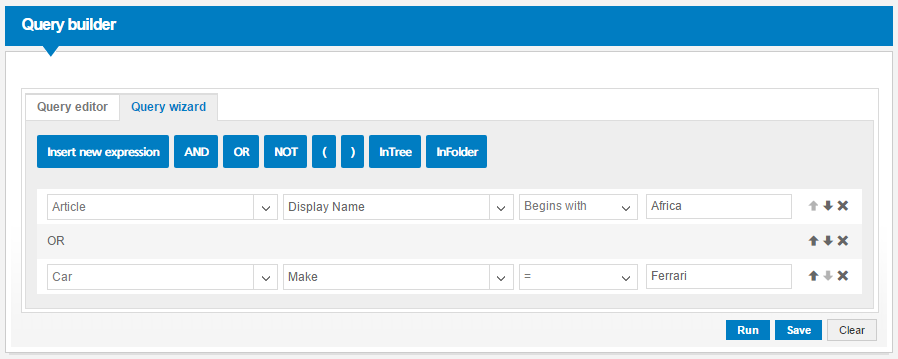
You can also use built-in query templates to determine the filter parameters dynamically. Templates are coming up when a meaningful search-expression is defined in the inserted row.
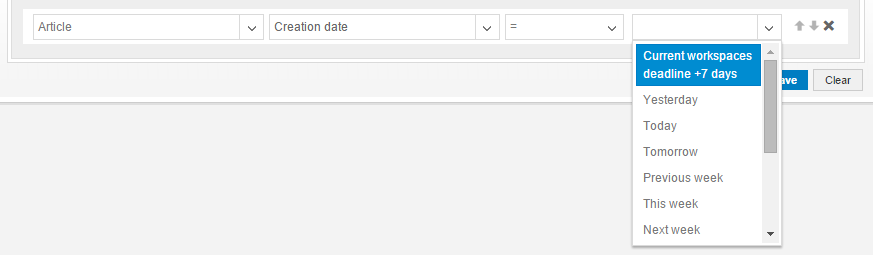
Templates will represent the following queries:
| Query template | Filter parameter |
|---|---|
| Username of current user | @@CurrentUser.Name@@ |
| Full-name of current user | @@CurrentUser.FullName@@ |
| Path of current workspace | @@CurrentWorkspace.Path@@ |
| Current workspaces deadline + 7 days | @@CurrentWorkspace.Deadline.AddDays(7)@@ |
| Current site | @@CurrentSite.Path@@ |
| Current list | @@CurrentList.Path@@ |
| Current page | @@CurrentPage.DisplayName@@ |
| Yesterday | @@CurrentDate.MinusDay(1)@@ |
| Today | @@CurrentDate@@ |
| Tomorrow | @@CurrentDate.AddDay(1)@@ |
| Previous week | @@CurrentWeek.Minus(1)@@ |
| This week | @@CurrentWeek@@ |
| Next week | @@CurrentWeek.Add(1)@@ |
| Previous month | @@CurrentMonth.Minus(1)@@ |
| This month | @@CurrentMonth@@ |
| Next month | @@CurrentMonth.Add(1)@@ |
| Previous year | @@CurrentYear.Minus(1)@@ |
| This year | @@CurrentYear@@ |
| Next year | @@CurrentYear.Add(1)@@ |
Although you can build complex queries with the Query Wizard, if you want to use all the features of Sense/Net Content Query Language, you have to select the Query Editor tab. Note: since the Query Builder can be configured to show only the Query Wizard, the Query Editor may be unavailable for you.
Query Editor
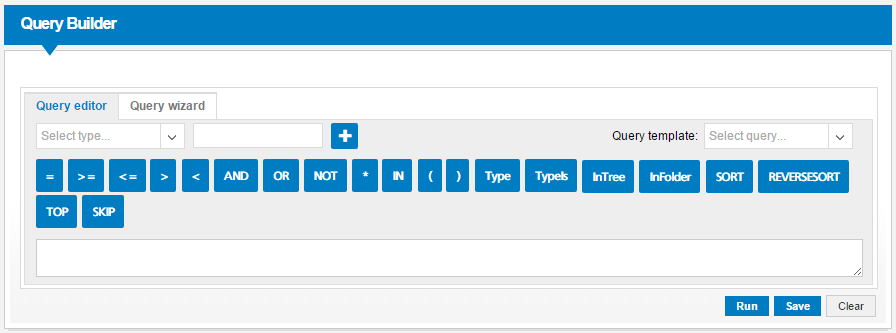
If you are familiar with Sense/Net Content Query Language (CQL), you can use the Query Editor to create complex queries. The full functionality of CQL is available for you. If you want to add a field to the query, apart from typing it in the text area, you can also choose from the content type dropdown, then the field of the content type. The Query Editor, just as the Query Wizard can be configured to show only one content type. In this case you can choose only from the fields of the given content type. While creating queries you can also use other helpers available from the toolbar. You can read more about all the available Sense/Net Content Query Language features on this wiki page.
In the Query Editor you can also insert templated filter-parameters, even typing it directly to the query-text-area, or chosen from the "Query template" -dropdown: