Content query presenter Portlet
- 100%
- 6.0
- Enterprise
- Community
Planned
Overview
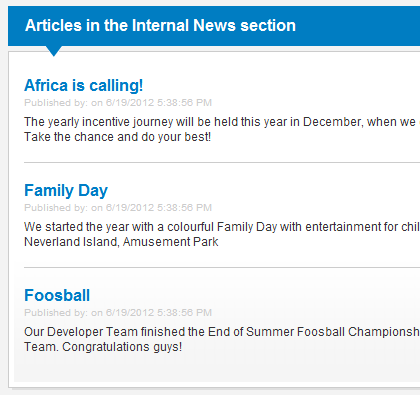
Sense/Net ECMS is all about content. Creating, modifying and displaying content is essential part of this system and displaying multiple content is the most commonly used feature of Sense/Net. Content query presenter Portlet is one of the three main portlets aiding this task (the other ones are the Content List Portlet that can be used to display items or files that reside in a content list and the Content collection Portlet).
Details
Content query presenter Portlet is able to display multiple content on portal pages. The most common examples are news or article lists, latest memos or top rated products.
For developers: the portlet is inherited from the Content collection Portlet and has the same behavior but only the subset of its features.
Content to display
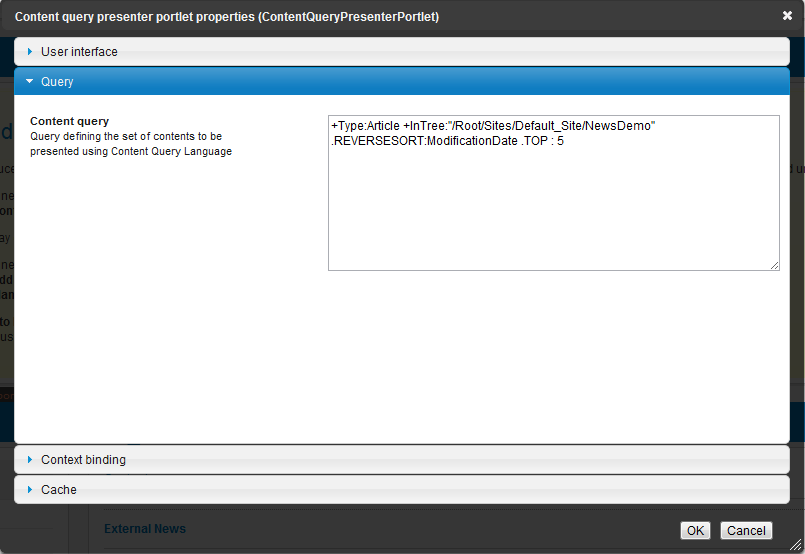
The displayed content are collected using a Content Query. Any query setting - like Top, Skip or sorting - can be set inside the query text (for example only top 5 content of type Article and the ones that were created this week in reverse order).
Caching
Be aware that caching is switched ON by default on the content query portlet. If you want changes to take effect immediately (after adding new items for example) please switch caching off.
Properties
Own properties
| Property | Property name for embedding | Possible values | Description |
|---|---|---|---|
| Content query | QueryString | Query defining the set of contents to be presented using Content Query Language |
Inherited properties
User interface
| Property | Property name for embedding | Possible values | Description |
|---|---|---|---|
| Portlet title | Title | text | Sets the visible title of the current portlet. Title header visibility is controlled with the Appearance property |
| Appearance | ChromeType | Default None TitleAndBorder TitleOnly BorderOnly |
Controls title and border visibility. By default both are visible |
| View | Renderer | Repository path | A custom view to render te portlet. |
| Custom CSS class(es) | SkinPreFix | text | When set portlet container div gets an extra css class. Ie. 'skinexample' adds css class 'skinexampleSkin' to container div |
Cache
| Property | Property name for embedding | Possible values | Description |
|---|---|---|---|
| Portlet is cached | Cacheable | true/false | If set the output of the portlet will be cached |
| Portlet is cached for... | CacheableFor | VisitorsOnly Everyone |
In case of 'Everyone' the output of the portlet will be cached for logged in users as well. |
| Portlet context influences caching | CacheByContext | true/false | Defines whether the current context path is included in the cache key. When unchecked portlet output is preserved regardless of the page's current context content or request path. Check it if you want to cache portlet output depending on the requested context content. |
| Request path influences caching | CacheByPath | true/false | Defines whether the requested content path is included in the cache key. When unchecked portlet output is preserved regardless of the page's current context content or request path. Check it if you want to cache portlet output depending on the requested context content. |
| Url query params influence caching | CacheByParams | true/false | Defines whether the url query params are also included in the cache key. When unchecked portlet output is preserved regardless of changing url params |
| Language influences caching | CacheByLanguage | true/false | Defines whether the language code is also included in the cache key. When unchecked portlet output is preserved regardless of the language that the users use to browse the site. If set, a different output will be cached for any language the users visit the site on. |
| Sliding expiration | SlidingExpirationMinutes | positive whole number | Given in seconds. The portlet is refreshed when it has not been accessed for the given time period |
| Absolute expiration | AbsoluteExpiration | positive whole number | Given in seconds. The portlet will be refreshed periodically with the given time period |
| Custom cache key | CustomCacheKey | text | Defines a custom cache key independent of requested path and query params. Useful when the same static output is rendered at various pages. |
| Debug | Debug | true/false | Check this property to show debug info about portlet cache state at the bottom of the portlet's layout |
for Portal builders
The easiest way to use the Content query presenter Portlet is to place it onto a portlet page. For more details check the following article:
Content collection views
Collecting the list of content is only the first part. To display the items you need to create a collection view. Sense/Net ECM system provides default collection views that you can use as a starting point.
- /Root/Global/renderers/ContentCollectionView.ascx
- /Root/Global/renderers/ContentCollectionView.xslt
XSLT views
Collection XSLT views are built upon an XML that the Content query presenter Portlet provides. You do not have to do anything about the xml; the portlet automatically provides it if you choose an XSLT view on the portlet properties window.
The XML provided by the portlet contains all the fields and actions of the listed content by default. You can fine-tune this by setting the Fields, Field list or Actions properties of the portlet to improve performance.
For more information about XSLT rendering check this article.
ASCX views
Ascx views are common ASP.NET user controls inheriting the ContentCollectionView class. They have access to the list of content provided by the portlet and have full control above the rendered html.
<%foreach (var content in this.Model.Items)
  { %>
    <div class="sn-content sn-contentlist-item">
        <h1 class="sn-content-title">
            <%=Actions.BrowseAction(content)%>
            <%if (Security.IsInRole("SmartEditors"))%>
                <%= Actions.ActionMenu(content.Path, "[SN]", "ListItem") %>
        </h1>
    </div>
<%} %>
For more information about collection views check this article.
Page template and control embedding
Use the following markup if you want to embed the portlet into your Page Template or custom control. The attributes/options are the same as seen in the Properties section above (don't forget to include a unique ID and the runat="server" attributes).
<snpe:ContentQueryPresenterPortlet Title="Top News" ChromeType="BorderOnly"
   QueryString="+TypeIs:NewsItem .TOP:5 .REVERSESORT:CreationDate"
   Renderer="/Root/Global/renderers/NewsCollectionView.ascx"
   ID="TopNews" runat="server" />
Example/tutorials
Related links
- Collection View
- XSLT Renderer
- Content collection Portlet
- Content List Portlet
- Content viewer Portlet
- List of Portlets
- Portlet
- Smart Pages
- How to display a Content Collection on a page
- How to develop a custom content collection portlet
- Smart Folder
References
There are no external references for this article.
