TagList Field Control
From Sense/Net Wiki
- 100%
- 6.0
- Enterprise
- Community
Planned
Overview
This Field Control is resposible for displaying and setting tags stored on the content, in the Content Explorer or on a page of your portal. For the Tags field, this control will be rendered automatically for every content.
Details
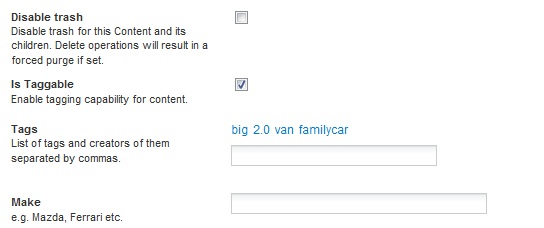
- In browse mode it only displays tags of the actual content as links for instant searching.

- In edit beside the tags (links) a TextBox is displayed as well, for adding new tags to the content.
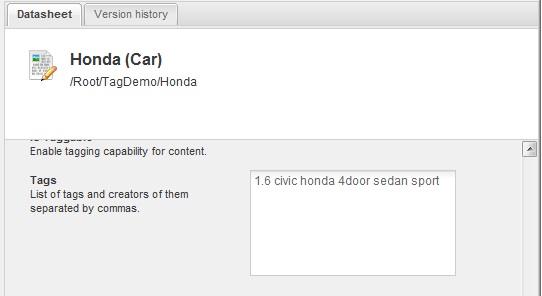
- If the viewer user has administrator privileges, the control renders without any links, as a multi-line TextBox so tags can be removed from the content this way.
Supported Field types
Properties
The following properties can be set on Reference:
- SearchPath: The path of the tag search application. This app will be used for searching when a tag link is clicked. Default value: "/Root"
- SearchFilterName: The URL parameter name for searching. It depends on the search application. Default value: "TagFilter"
- TagSplitChars: A String paramater which represents an array of splitting characters. The value of Tags field will be splitted based on these on load. Also, on each save all the separator characters will be replaced by a single space (" "). Default value: { ' ' }
- NotAllowedChars: A String paramater which represents an array of not allowed characters. These will be removed from newly added tags. Default value: { '&', '\\', '/', '?' }
Templates
Browse view template
Edit view template
Example/Tutorials
Generic Example
 <sn:TagList ID="{UniqueId}" runat="server" FieldName="{FieldName}" SearchPath="{SearchPath}"
SearchFilterName="{SearchFilterName}" TagSplitChars="{TagSplitChars}" NotAllowedChars="{NotAllowedChars}"  />
Specific short example
This example displays the tags from the "Tags" field of the content. For SearchPath, TagSplitChars, NotAllowedChars the default values will be used.
<sn:Reference ID="TagList1" runat="server" FieldName="Tags" />Specific long example
This example displays the tagging control for the actual content using custom search page, separator and not allowed characters.
 <sn:Reference ID="TagList1" runat="server" FieldName="Tags" SearchPath="/Root/MySearchPage.aspx"
SearchFilterName="MyParamName" TagSplitChars=";.:-+" NotAllowedChars="+,132" />
