Parametric search Portlet
- 100%
- 6.0
- Enterprise
- Community
Planned
Overview
Parametric search Portlet allows you to define customized search interfaces and define a query template to run parametric Content Queries based on various user input.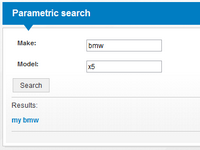
Details
In contrast to the Context search Portlet that is presented in the demo install http://localhost/features/search  , which displays a simple search textbox and accepts query texts in Query syntax, the Parametric search Portlet allows the builder to create more sophisticated search interfaces, with labels and multiple textboxes, and define templated queries that depend on the user input.
Query configuration
The Parametric search Portlet inherits from the Content collection Portlet, and uses its children query filter functionality to utilize search. The additional query defined with the Query template property will be appended to the Children query filter.
- To configure the portlet to search under a specific path:
- use the Context binding properties (Context binding tab) to select root search path,
- and check the All children property (Collection tab) to include every content under the specific path, not just direct children.
- To define a custom user interface:
- create an ascx file with asp.Net controls,
- reference it with the Input Renderer property (Render tab).
- To set up a query to work together with the defined user interface:
- define parametric query with Query Template property (Query admin tab) and use the %controlID% markup in the query to mark user inputs, where controlID corresponds to the ID of an asp.Net control (ie. TextBox) defined in the user interface ascx file,
- define additional query terms with the Children filter property (Collection tab).
- The resulting query will be in the form +(children) +(template). The %controlID% fragments will be replaced with the value of the corresponding control (see #Example/Tutorials section for a complete comprehensive example).
Template resolution
The defined query template is resolved in different ways depending on the user input and configuration. The following rules apply to every parameter during template resolution:
- 1. if the user input is empty or contains wildcard only
- the whole term is removed from the template query, ie.: for +_Text:%input% and * or *** or empty as input the resulting query will be empty.
- 2. paramter is given in the form of "%param%"
- quotation marks are removed from the user input, but otherwise the input is substituted in the markup as-is, without changes.
- 3. user input is given between quotes (ie. "hello world")
- the input will be substituted in the markup as-is, without changes.
- 4. user input consists of a single word
- user input is put between quotation marks to allow query for special chars like : and +,
- in case Exact search property is unchecked, the terms will include a wildcard character, ie.: for +_Text:%input% and notexact as input the resulting query will be +_Text:"notexact*".
- 5. user input consists of multiple words
- user input is put between quotation marks to allow query for special chars like : and +,
- the user input is split along spaces and each word is queried as a separate term, ie.: for +_Text:%input% and multiple words as input the resulting query will be +_Text:"multiple" +_Text:"words",
- in case Exact search property is unchecked, the terms will include a wildcard character, ie.: for +_Text:%input% and notexact as input the resulting query will be +_Text:"notexact*".
If you are uncertain about what query the template has been resolved to for different user inputs, use the Query debug portlet property to display the resolved query in the portlet markup.
Allow empty search
If the Allow empty search property is false, empty resulting query from query template is not allowed. For example if the query template is +_Text:%input% and user input is *, it will be resolved to an empty query expression which is not allowed. However, if the template contains more terms that do not resolve to empty terms, like +_Text:%input% +Type:Car (which will be resolved to +Type:Car for empty user inputs) the resulting query is not considered as empty. To avoid this behavior use only parametric terms in Query Template property, and give static terms in the Children filter property.
If the portlet is configured to disallow empty searches and the template is resolved to an empty query the portlet will show a defined panel to indicate to the user that empty queries are not allowed. This panel should be defined in the input renderer ascx, with the following markup:
<asp:Panel ID="EmptyQueryErrorPanel" runat="server" Visible="false">
Empty queries are not allowed.
</asp:Panel>
User specific parameters
You can use parameters to access properties of logged in user. Syntax is: %user.{property}% (e.g. %user.Language% refers to Language property of user) and it is case sensitive.
Result rendering
To define a custom renderer for rendering results, use the Renderer property (User interface tab).
Properties
Own properties
User interface
| Property | Property name for embedding | Possible values | Description |
|---|---|---|---|
| Input Renderer | InputRenderer | path | The form to be rendered for user input |
Search
| Property | Property name for embedding | Possible values | Description |
|---|---|---|---|
| Query Template | QueryTemplate | text | Parametric query template. Include parameters with %controlID% markup where controlID is the ID of the corresponding asp.Net control in the ascx defined with Input Renderer property. |
| Exact Search | ExactSearch | true/false | Leave unchecked to automatically add '*' as a suffix to user inputs. |
| Allow empty search | AllowEmptySearch | true/false | If checked the search will be executed even if the resolved template query is empty. |
| Query debug | QueryTemplateDebug | true/false | Check this property to show debug info about resolved query template at the bottom of the portlet's layout. |
Inherited properties
User interface
| Property | Property name for embedding | Possible values | Description |
|---|---|---|---|
| Portlet title | Title | text | Sets the visible title of the current portlet. Title header visibility is controlled with Appearance property |
| Appearance | ChromeType | Default None TitleAndBorder TitleOnly BorderOnly |
Controls title and border visibility. By default both are visible |
| Renderer | Renderer | path | Select an ASCX or XSLT renderer for rendering portlet output |
| Custom CSS class(es) | SkinPreFix | text | When set portlet container div appends extra css class(es) |
Context binding
| Property | Property name for embedding | Possible values | Description |
|---|---|---|---|
| Bind Target | BindTarget | Unselected CurrentContent CurrentSite CurrentPage CurrentUser CurrentStartPage CustomRoot CurrentWorkspace |
Select the bound content. Set it to CustomRoot to select a content with absolute path regardless of the context |
| Custom root path | CustomRootPath | Root relative Repository path | Define bound content with absolute path when Bind Target is set to CustomRoot |
| Ancestor selector index | AncestorIndex | positive whole number | Set the bound content to the ancestor of Bind Target specified by index. 0 leaves the bound content as specified above, 1 selects parent, higher value selects higher order ancestor |
| Relative content selector path | RelativeContentPath | relative Repository path | Sets the bound content relative to the above settings with a relative path. Ie.: 'CustomChildFolder/CustomNode' selects 'CustomNode' from Bind Target's 'CustomChildFolder' child folder. Relative to ancestor when Ancestor selector index is set |
Collection
| Property | Property name for embedding | Possible values | Description |
|---|---|---|---|
| Collection source | CollectionAxis | Children ReferenceProperty VersionHistory External |
The source for the listed collection. 'Children' lists child contents of target, 'ReferenceProperty' lists referenced contents using given Reference property, 'VersionHistory' lists target's versions and 'External' uses ids from url parameters as source. |
| Reference property name | ReferenceAxisName | text | The property name to use as the reference source |
| Uri parameter name | UriParameterName | text | The Uri parameter name to use as external source |
| All children | AllChildren | true/false | Leave unchecked if you want to get only direct children of content. Check it if you want to get all children of content. |
| Children filter | QueryFilter | text | Optional filter for the children query |
| Sort by | SortBy | text | Sort field name |
| Sort descending | SortDescending | true/false | Sort results by sort field ascending or descending |
| Enable paging | PagingEnabled | true/false | Set it to false to list all contents on one page. Set it to true and use the 'Top' parameter to show only a given number of contents simultaneously |
| Show pager control | ShowPagerControl | true/false | Set to true to show default pager controls at the top and the bottom of results |
| Top | Top | number | The first given number of contents are listed |
| Skip first | SkipFirst | number | The first given number of contents are skipped |
| Enable autofilters | EnableAutofilters | Default Enabled Disabled |
If autofilters are enabled, system contents are not shown in the result |
| Enable lifespan filter | EnableLifespanFilter | Default Enabled Disabled |
If lifespan filter is enabled, only contents with valid StartDate and EndDate will be in the result |
| Visible fields | VisibleFields | text | A comma separated list of fields presented in the list |
Example/Tutorials
The following screenshots show an example of using the Parametric search Portlet to define a specific query with the corresponding user friendly interface. First, we will define two input fields for searching Car content - Make and Model. The markup for the user interface looks like this, save it to /Root/System/SystemPlugins/Portlets/ParametricSearch/MyCarSearchForm.ascx:
<%@ Control Language="C#" AutoEventWireup="true" Inherits="System.Web.UI.UserControl"  %>
<div class="sn-inputunit ui-helper-clearfix">
    <div class="sn-iu-label" style="width:100px;"><label class="sn-iu-title">Make:</label></div>
    <asp:TextBox ID="makeInput" runat="server" CssClass="ui-corner-all sn-iu-ctrl" />
</div>
<div class="sn-inputunit ui-helper-clearfix">
    <div class="sn-iu-label" style="width:100px;"><label class="sn-iu-title">Model:</label></div>
    <asp:TextBox ID="modelInput" runat="server" CssClass="ui-corner-all sn-iu-ctrl" />
</div>
<asp:Button ID="btnSearch" runat="server" Text="Search" CssClass="sn-button sn-submit" />
<hr />
Results:
The query that will be executed at each search is defined with the Query Template portlet property and looks the following:
+Make:%makeInput% +Model:%modelInput%
Additional query terms are added to the Children Filter property:
Type:Car
Other portlet properties:
- Uncheck Exact Search.
- Uncheck Allow empty search.
- Set Input Renderer to /Root/System/SystemPlugins/Portlets/ParametricSearch/MyCarSearchForm.ascx.
- Set Context binding to Current Site.
- Collection source should be children.
- Check All children.
The user interface and results will look the following:
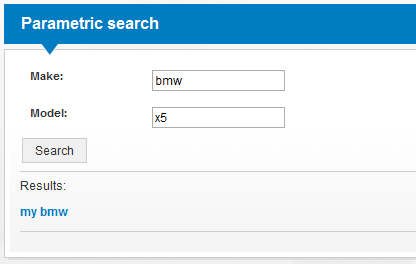
The above input will be compiled to the following Content Query: +(Type:Car) +(+Make:"bmw*" +Model:"x5*").
