Image Resizer Application
- 67%
- 6.0
- Enterprise
- Community
Planned
Overview
Image Resizer Application is a smart application which enables you to display an image in different sizes.
Details
The application resize the given image at the first time usage, and cache it in file system. After that its display the stored image, so save time and system resources. If the application is modified or deleted its free the cache.
You can configure the cache folder location in Web.config, in ResizedImagesCacheFolder varible.
Another worthwhile place to put the folder as the website, because it performs a lot of file, which can cause problems.
For portal builders
You can create new Image Resizer Application to go to (apps) folder then the choosen content type's folder and click new. Then choose Image Resizer Application. After this you can customze the application:
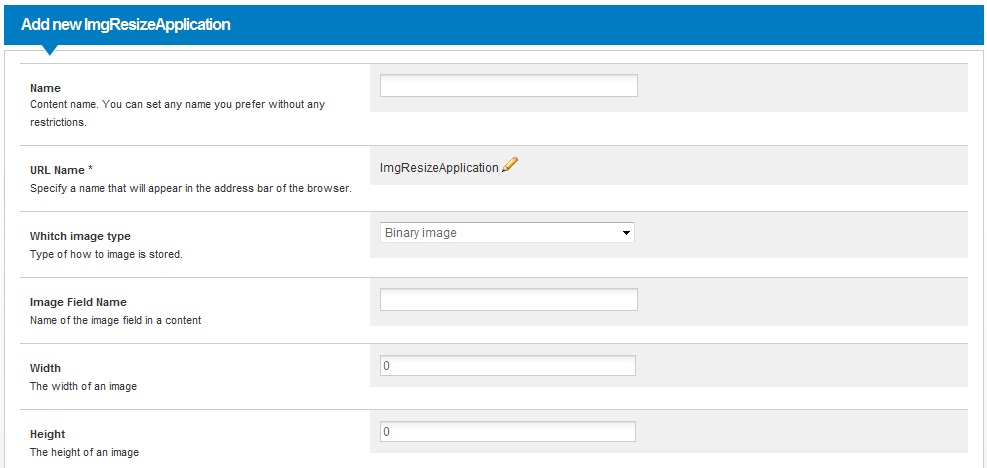
Application properties
| Property | Possible values | Description |
|---|---|---|
| ImageType | Binary image Image Reference Image Field Attachment |
You can choose the source of the image. |
| ImageFieldName | One of content's field name | You can specify the name of the field. |
| Width | positive whole number | The width of the new image |
| Height | positive whole number | The height of the new image |
How to use
After you created the new application don't forget set its permissions. Configure it to add Everyone user group and add See,Open, and runApplication rights. Then you can simply complete the content's url with ?action=<the application name> , and you can get the resized image.
