Notification list Portlet
- 100%
- 6.0.4
- Enterprise
- Community
Planned
Overview
Notification list Portlet is responsible for listing the Notifications in the portal. The Notifications represents any type of Content changes in the portal.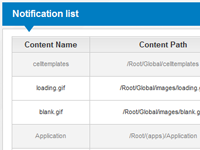
Details
The Notification list Portlet is a Context bound portlet. This means that the functionality of the portlet depends on the Content being bound to the portlet. See Context Binding properties below for more details.
Please note the you can only edit your own notifications or you got to have Save permission for the user who's notifications you are planing to edit
Properties
Inherited properties
Context binding
| Property | Property name for embedding | Possible values | Description |
|---|---|---|---|
| Bind Target | BindTarget | Unselected CurrentContent CurrentSite CurrentPage CurrentUser CurrentStartPage CustomRoot CurrentWorkspace |
Select the bound content. Set it to CustomRoot to select a content with absolute path regardless of the context |
| Custom root path | CustomRootPath | Root relative Repository path | Define bound content with absolute path when Bind Target is set to CustomRoot |
| Ancestor selector index | AncestorIndex | positive whole number | Set the bound content to the ancestor of Bind Target specified by index. 0 leaves the bound content as specified above, 1 selects parent, higher value selects higher order ancestor |
| Relative content selector path | RelativeContentPath | relative Repository path | Sets the bound content relative to the above settings with a relative path. Ie.: 'CustomChildFolder/CustomNode' selects 'CustomNode' from Bind Target's 'CustomChildFolder' child folder. Relative to ancestor when Ancestor selector index is set |
User interface
| Property | Property name for embedding | Possible values | Description |
|---|---|---|---|
| Portlet title | Title | text | Sets the visible title of the current portlet. Title header visibility is controlled with Appearance property |
| Appearance | ChromeType | Default None TitleAndBorder TitleOnly BorderOnly |
Controls title and border visibility. By default both are visible |
| View Path | ContentViewPath | Repository path | Path of the .ascx user control which provides the elements of the portlet |
| Renderer | Renderer | Repository path | Select an XSLT renderer for rendering portlet output |
| Custom CSS class(es) | SkinPreFix | text | When set portlet container div appends extra css class(es) |
Cache
| Property | Property name for embedding | Possible values | Description |
|---|---|---|---|
| Portlet is cached | Cacheable | true/false | If set the output of the portlet will be cached |
| Portlet is cached for logged in user | CacheableForLoggedInUser | true/false | If set the output of the portlet will be cached even if the user is logged in. |
| Request path influences caching | CacheByPath | true/false | Defines whether the requested content path is included in the cache key. When unchecked portlet output is preserved regardless of the page's current context content or request path. Check it if you want to cache portlet output depending on the requested context content. |
| Url query params influence caching | CacheByParams | true/false | Defines whether the url query params are also included in the cache key. When unchecked portlet output is preserved regardless of changing url params |
| Language influences caching | CacheByLanguage | true/false | Defines whether the language code is also included in the cache key. When unchecked portlet output is preserved regardless of the language that the users use to browse the site. If set, a different output will be cached for any language the users visit the site on. |
| Absolute expiration | AbsoluteExpiration | positive whole number | Given in seconds. The portlet will be refreshed periodically with the given time period |
| Sliding expiration | SlidingExpirationMinutes | positive whole number | Given in minutes. The portlet is refreshed when it has not been accessed for the given minutes |
| Custom cache key | CustomCacheKey | text | Defines a custom cache key independent of requested path and query params. Useful when the same static output is rendered at various pages |
| Debug | Debug | true/false | Check this property to show debug info about portlet cache state at the bottom of the portlet's layout |
for Portal builders
About the Content View
The Notification list Portlet uses an .ascx View to show the list of Notifications in the system. In our case we used a ListView control to represent the list. But any type of bindable server control can be used here.
There must be a bindable server control in the View with an ID "ContentList" to make the Portlet work correctly.
In this View we used Dynamic Content to represent the current User. This code shows this:
<sn:ContextInfo runat="server" ID="ContextInfoUser" Selector="CurrentUser" />
For action links we used ActionLinkButtons binded to the Dynamic Content which is the current User at this point as we mentioned previously. These link buttons can be binded to the Dynamic Content by adding ContextInfoID attribute with the ID of the Dynamic Content as it's value.
The full source of the View can be seen below:
<%@ Control Language="C#" AutoEventWireup="true" Inherits="SenseNet.Portal.UI.SingleContentView" %>
<%@ Register Assembly="SenseNet.Portal" Namespace="SenseNet.Portal.UI.Controls" TagPrefix="sn" %>

<sn:ContextInfo runat="server" ID="ContextInfoUser" Selector="CurrentUser" />

<asp:Panel ID="pnlNotification" runat="server" CssClass="sn-notification" >
    <asp:ListView ID="ContentList" runat="server" EnableViewState="false">
        <LayoutTemplate>
            <table class="sn-notification-table sn-calendar">
                <tr>
                    <th>Content Name</th>
                    <th>Content Path</th>
                    <th>Frequency</th>
                    <th colspan="3">Actions</th>
                </tr>
                <asp:PlaceHolder ID="itemPlaceHolder" runat="server" />
            </table>
            <sn:BackButton ID="BtnBack" runat="server" Text="Back" CssClass="sn-submit" style="float: right;" />
        </LayoutTemplate>
        <ItemTemplate>
            <tr class='<%# (bool)((SenseNet.ContentRepository.Content)Container.DataItem)["IsActive"] ? "sn-active" : "sn-deactive" %>' runat="server">
                <td>
                    <%# (SenseNet.ContentRepository.Content.Load(Eval("ContentPath").ToString())).DisplayName %>
                </td>
                <td><span><%# Eval("ContentPath") %></span></td>
                <td><span class="sn-frequency"><%# Enum.GetName(typeof(SenseNet.Messaging.NotificationFrequency), Convert.ToInt32(Eval("FrequencyId"))) %></span></td>
                <td>
                    <sn:ActionLinkButton runat="server" ID="BtnSetActivation" CssClass="sn-link" ActionName="SetActivation" ContextInfoID="ContextInfoUser" IconVisible="false"
                        ParameterString='<%# "ContentPath=" + Eval("ContentPath") + ";IsActive=" + Eval("IsActive") %>'>
                        <%# (bool)((SenseNet.ContentRepository.Content)Container.DataItem)["IsActive"] ? "Deactivate" : "Activate" %>
                    </sn:ActionLinkButton>
                </td>
                <td>
                    <sn:ActionLinkButton runat="server" ID="BtnEdit" CssClass="sn-link" ActionName="Notification" IconVisible="false" NodePath='<%#Eval("ContentPath") %>'
                        ParameterString='<%# "ContentPath=" + Eval("ContentPath") %>'>
                        Edit
                    </sn:ActionLinkButton>
                </td>
                <td>
                    <sn:ActionLinkButton runat="server" ID="BtnDelete" CssClass="sn-link" ActionName="DeleteNotification" IconVisible="false" NodePath='<%#Eval("ContentPath") %>'>
                        Delete
                    </sn:ActionLinkButton>
                </td>
            </tr>
        </ItemTemplate>
    </asp:ListView>
</asp:Panel>
Example/Tutorials
If you have a Sense/Net portal installed on your machine you can access this Notification functionality by browsing the notifications action of the current user. For example: http://localhost/Root/IMS/BuiltIn/Portal/Admin?action=notifications.
