How to internationalize portlet property dropdowns
From Sense/Net Wiki
- 100%
- 6.0.8
- Enterprise
- Community
Planned
Contents |
Overview
Dropdown values in Portlet Property Editor dialogs can be localized according to the following.
Details
To localize an enum value in a Portlet Property dropdown, simply create or update the value for the resource key under PortletFramework class in the following form:
Enum-PropertyName-EnumValue
Where PropertyName is the name of the property, and EnumValue is the value of the coded enum. You can easily find out the property name by moving your mouse over the property title:
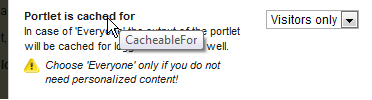
The EnumValue is the element in the underlying enum in the C# code, but if it has not been localized yet, the dropdown will show the EnumValue.
Defining the string resources is easy from here:
  <ResourceClass name="PortletFramework">
    <Languages>

      ...

      <Language cultureName="en">
        <data name="Enum-CacheableFor-Everyone" xml:space="preserve">
          <value>Everyone</value>
        </data>
        <data name="Enum-CacheableFor-VisitorsOnly" xml:space="preserve">
          <value>Visitors only</value>
        </data>

      ...
Related links
References
This page does not have external references.
