Facebook like Portlet
From Sense/Net Wiki
- 100%
- 6.0
- Enterprise
- Community
Planned
Overview
Facebook Like Portlet enables you to add Facebook actions to your portal, such as Like and Recommend. You can easily modify the main properties for example the style or the width of the layout, the action, the font of the button, the color schema and whether it shows faces. The posted hyperlink will be the current page's URL.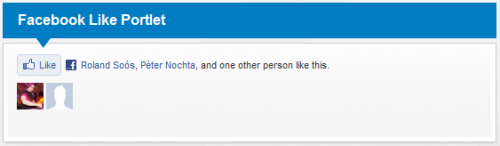
Details
Properties
Own properties
| Property | Property name for embedding | Possible values | Description |
|---|---|---|---|
| Layout style | LayoutStyle | Standard Button and count |
You can choose between two standard layouts. Default value is the Standard layout |
| Show faces? | ShowFaces | true/false | You can specify whether to display profile photos below the button. It works only in standard layout |
| Width | ButtonWidth | positive whole number | The width of the Like button |
| Like button text | Action | Like Recommend |
The verb to display on the button. Default value is Like |
| Like button font | ButtonFont | Arial Lucida Grande Segoe Ui Tahoma Trebuchet Ms Verdana |
You can choose which font to display in the button |
| Color schema | ColorSchema | Light Dark |
You can choose between two available color schemas: light and dark. Default value is Light |
User group informations
for End users
How to use
To use this portlet you can simply add it to a page with the 'Add Portlet' action. When you added it, it will work properly with default settings but you can simply customize it as it was mentioned below.
for Portal builders
Customizing the portlet
When this Facebook Portlet is added to a page you can easily modify it's parameters. To do so go to Edit mode on the page and click on the the Edit action at the top right corner of the portlet (see image below):

After this the Edit Panel is displayed. This panel allows the user to customize the portlet:
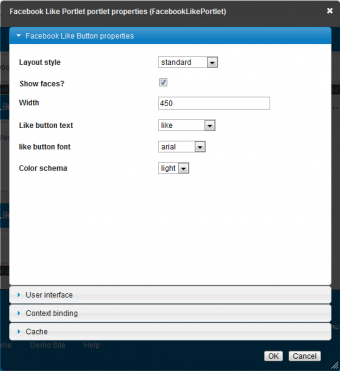
As the image shows there are several options here we can customize:
- Layout Style:
- There are two options here. In Standard style mode the API will use Like button and it will list the people who like it as shown on the image:
- In button_count style mode the API will use Recommend button and it will only show the number of the people who liked it:

- Show faces: Here you can define to show or to not to the image of the people who liked or recommended the actual page.
- Width: Here you can define the width of the API (inside the page template zone) in pixels.
- Like button text: Here you can define the button's text: Like' or Recomend.
- Like button font: Here you can define a font that the API will use. Avalaible fonts are: arial, lucida, grande, segoe, ui, tahome, trebuchet, ms or verdana
- Color schema: Here you can define the color schema to be dark or light.
